
Organize Your Sales with Snypto’s New Kanban!
Tabela de conteúdo
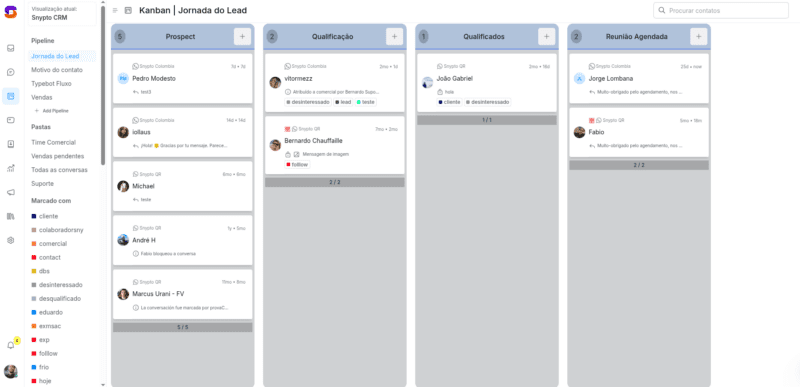
Snypto has an amazing new feature for you! Introducing the Kanban, a powerful tool to organize your clients and boost your sales. With it, it’s easy to track your clients at every stage of the sales process.
What is Kanban?
Kanban is a visual way to organize work. Imagine a board divided into columns, where each column represents a stage in your sales process. You move your clients from one column to the next as they progress.
How to Use Snypto’s Kanban
1. Create Your Sales Pipeline
The pipeline is your sales flow, showing the steps a client takes until the deal is closed. To create your pipeline in Snypto:
Go to the Kanban icon on the platform.
Add a new pipeline.
Name your pipeline, such as “Sales Flow” or “Qualification Journey.”
Add a description to help identify your pipeline.
2. Set Up the Stages of Your Pipeline
Stages are the steps the client takes during the sales process. For example:
Prospecting: Clients you’re reaching out to.
Qualification: Clients you’re evaluating to see if they have potential.
Meeting Scheduled: Clients with a scheduled meeting.
Sale Closed: Clients who have purchased your product or service.
To add stages, simply type the name of each one and press “Enter.” You can customize the stages to fit your business.
3. Add Your Leads to the Kanban
Leads are your potential clients. To add them to the Kanban, click the “+” and select leads from your list. They will appear in the first stage of your pipeline, usually “Prospecting.”
4. Move Leads Through the Stages
As you progress with leads, drag them to the next stages in the Kanban. This gives you a clear view of where each client is in your sales process.
Automate Messages to Your Leads
To make your life even easier, you can schedule automated messages for each Kanban stage. So when you move a lead from one stage to another, the system sends a personalized message.
How to Create Automated Messages
Click the gear icon in the top-right corner of the Kanban.
Choose the stage where you want to create a message.
Write the message that will be sent when the lead reaches this stage.
For example, you can create a thank-you message when a lead is moved to the “Meeting Scheduled” stage:
“Thank you so much for scheduling! See you at our meeting.”
Where to Find It?
Don’t waste any more time! Start using Snypto’s Kanban today and see how it can transform your sales.
Why Use Snypto’s Kanban?
Organization: See your entire sales process in one place.
Speed: Easily move leads through the stages.
Automation: Send automatic messages to your leads.
Productivity: Free up more time to focus on closing deals.
Conclusion
Snypto’s Kanban is a powerful tool to organize your sales and boost your productivity. Try it out and see how it can help you reach your goals!
Want to start using Snypto’s Kanban right now?
Visit Snypto.com and start selling on autopilot!
🇬🇧 👉 Watch the video in English: https://youtu.be/Bv-lGAkymqk
🇪🇸 👉 Watch the video in Spanish: https://youtu.be/Bv-lGAkymqk
🇧🇷 👉 Watch the video in Portuguese (Brazil): https://youtu.be/Bv-lGAkymqk
Are you interested in having your own brand?
Please fill out the following form with your information. This will help us meet your needs more efficiently and personally. We guarantee the confidentiality and security of your data.


 English
 Português do Brasil
 Español